For the complete documentation index, see llms.txt. Markdown versions of all pages are available by appending .md to any URL.
LLM observability
LLM observability is the practice of collecting and connecting metrics, logs, traces, and events from every layer of an LLM system so you can understand how it behaves in production. It covers the GPUs, the inference engine, the request path, and the application on top. The goal is to detect problems early, explain why they happen, and keep responses fast, reliable, and affordable.
Without observability, diagnosing latency spikes, scaling problems, or wasted GPU capacity becomes guesswork. Worse, silent issues like cache thrashing or request preemption can degrade the service for hours before anyone notices.
These risks are pushing organizations to invest. Gartner predicts that by 2028, LLM observability investments will cover 50% of GenAI deployments, up from 15% in 2026.
This page focuses on observability for self-hosted LLM inference, where you own the infrastructure stack.
Why LLM inference needs dedicated observability
LLM observability builds on standard cloud monitoring, since the metrics you'd normally rely on don't tell the whole story. Here's why they fall short:
- Requests aren't uniform. One request may generate 20 tokens and another 4,000. Requests per second (RPS) says little about the real load on a GPU. Token counts and concurrency say much more.
- Latency has two phases. Prefill determines how fast the first token arrives. Decode affects how fast the rest stream. A single "request latency" number hides which phase is slow. See how LLM inference works.
- Replicas are stateful. Each replica holds a KV cache for active requests and, with prefix caching, for reuse across requests. Cache pressure and cache hit rate drive latency, but a generic web dashboard shows neither.
- GPU utilization can be misleading. The standard metric (like
utilization.gpushown innvidia-smi) reports the fraction of each sample period during which at least one kernel was running. It doesn't measure how many of the GPU's SMs were occupied or how much memory bandwidth was being used. A kernel can therefore run continuously while using only a fraction of the GPU's available resources, yet the GPU can still report 100% utilization. - Failures are often silent. A replica can stay "healthy" while it preempts requests, thrashes the cache, or produces worse outputs.
The four signals of LLM observability
LLM observability relies on four major types of telemetry. Each one answers a different question.
- Metrics are numeric time series, such as TTFT, KV cache usage, or GPU memory. They tell you what is happening and are cheap to store and alert on.
- Logs are timestamped records from containers and services. They tell you what happened in a specific request or process, such as an out-of-memory (OOM) error or a malformed input. Centralize them so you can search across replicas and time windows.
- Traces follow one request across services, such as a gateway, a router, the inference engine, and any tool calls. They tell you where time was spent. Traces are essential for multi-model pipelines and agent workflows, where one user request can trigger many LLM calls.
- Events record changes in the cluster, such as Pod restarts, scaling actions, scheduling delays, and model rollouts. They explain when and often why the system changed.
The real value comes from correlating them. For example, a TTFT spike (metric) that lines up with a scale-up (event) and slow weight loading (log) points straight to a cold start problem.
What to monitor: LLM metrics by layer
A production LLM observability stack covers five major layers. Problems in lower layers show up as symptoms in higher layers, so you need visibility into all of them.
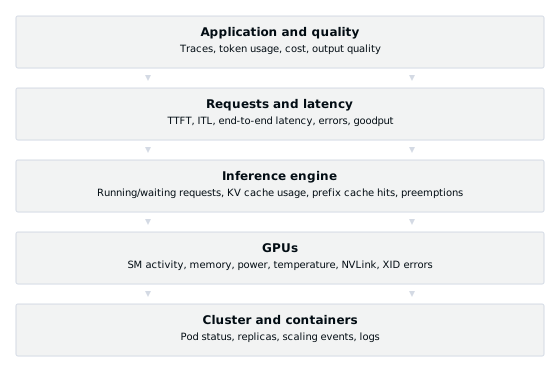
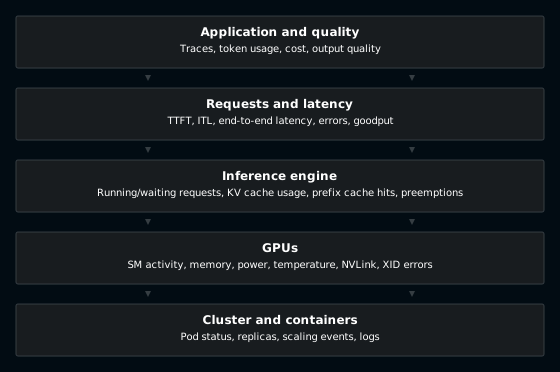
The following sections explain each layer, starting with the bottom cluster level and moving up.
Cluster and containers
These metrics tell you whether the serving infrastructure itself is healthy.
| Metric | What it tells you |
|---|---|
| Pod status and restarts | Detects failed, stuck, or crash-looping Pods that may affect availability. |
| Number of replicas | Verifies that autoscaling works and helps debug scaling delays. |
| Scaling events and cold start time | Shows how long new replicas take to serve traffic, including image pull and weight loading. |
| Resource requests and limits | Helps you tune scheduling and avoid over- or under-provisioning. |
Slow cold starts can cause latency spikes during traffic bursts. See fast scaling for ways to reduce them.
GPUs
GPUs are the most expensive part of the stack, so GPU metrics drive both performance tuning and cost control. Here are some common GPU metrics to track.
| Metric | What it tells you |
|---|---|
| GPU utilization | Fraction of the sample period when at least one kernel was running. Useful for spotting idle GPUs, but not for measuring how busy they are. |
| SM activity | Fraction of time at least one warp is active per streaming multiprocessor (SM), averaged across them. It shows how broadly the GPU is occupied, though active warps may be waiting on memory. |
| Tensor core activity | How much matrix-math hardware is in use. |
| Memory bandwidth activity | How busy GPU memory is. Decode at small batch sizes is often memory-bandwidth bound. |
| GPU memory used | Capacity headroom for weights and KV cache. |
| Power, temperature, and throttling indicators | Thermal or power limits on GPU performance. |
| NVLink bandwidth | Interconnect load on NVLink-connected GPUs in distributed inference. |
| XID errors | GPU error reports that may point to hardware, driver, or application faults. |
You don't need to collect them manually. Tools like the DCGM exporter for NVIDIA GPUs can expose supported health and profiling metrics to Prometheus for you.
Inference engine
Inference engine metrics are the layer that generic monitoring misses most often. They show how the model server schedules requests and manages memory.
| Metric | What it tells you |
|---|---|
| Running requests | How many requests are in the current batch. |
| Waiting (queued) requests | Requests the engine can't schedule yet. A growing queue can signal saturation. |
| KV cache usage | How full the KV cache is. Near 100%, new requests may wait, cached blocks may be evicted, or running requests may be preempted. |
| Prefix cache hit rate | How much prompt computation is reused. Low hit rates waste GPU time when prompts contain reusable prefixes. |
| Preemptions | Requests paused or rescheduled when resources such as KV cache run short. A sustained rate is a warning. |
| Prompt and generation tokens | Actual work done, in tokens. Better than RPS for capacity planning and cost. |
The number of running plus waiting requests (concurrency) is also one of the best signals for autoscaling LLM workloads, and KV cache usage is a key input for KV cache-aware routing.
Most open-source inference engines expose Prometheus metrics on a /metrics
endpoint, so you don't need custom instrumentation to get started.
Requests and latency
These metrics describe what users actually experience. The handbook page on LLM inference metrics defines each one in detail.
| Metric | What it tells you |
|---|---|
| Time to first token (TTFT) | How long users wait before the response starts. Driven by queueing and prefill. |
| Inter-token latency (ITL) / time per output token (TPOT) | How smoothly tokens stream. Driven by decode. |
| End-to-end latency | Total time for the full response. |
| Queue time | How long requests wait before the engine starts them. |
| Tokens per second | Throughput per replica and across the fleet. |
| Error rate | Failed, timed-out, or rejected requests. |
| Goodput | Requests per second that meet your latency SLOs. A measure of useful capacity at a chosen service target. |
Track latency percentiles (P50, P90, P99) alongside averages. A healthy median can hide a tail of users who wait 10 times longer.
Application and quality
The top layer answers questions infrastructure metrics can't, such as whether responses are correct and what each feature costs. Use the following signals to evaluate performance at this level:
- Traces and spans for each LLM call, retrieval step, and tool call in a pipeline or agent loop.
- Token usage and cost by model, tenant, user, or feature. For self-hosted models, use GPU-hours to estimate compute cost per million tokens and compare with API pricing. See inference cost.
- Output quality, using evaluations, user feedback, or LLM-as-a-judge scores, to catch regressions after a model or prompt change.
- Safety and format checks, such as invalid structured outputs, failed function calls, and guardrail triggers.
How to diagnose common LLM inference problems
Many LLM inference problems can be narrowed down with a few metrics. The table below maps common symptoms to the metrics to check and the usual fix.
| Symptom | Check these metrics | Likely cause | What to do |
|---|---|---|---|
| TTFT rises under load | Waiting requests, queue time, KV cache usage | Replicas are saturated and requests are queueing | Scale out; if KV cache pressure is high, cap per-replica concurrency or offload KV cache |
| TTFT is high on some replicas only | Per-replica queue length and cache hit rate | Uneven load or cache-unaware routing | Use load- and cache-aware routing |
| ITL spikes while TTFT looks fine | ITL percentiles, batch size, prompt length | Long prefills interrupt decode, or batches are too large | Tune chunked prefill or batch limits, or use prefill-decode disaggregation |
| Preemptions keep increasing | Preemptions, KV cache usage | KV cache runs out of space | Lower max concurrent sequences, give the KV cache more memory, or add replicas |
| Low prefix cache hit rate despite repeated prefixes | Prefix cache hits vs. queries | Prompts start with dynamic content, or requests spread across replicas | Restructure prompts and use prefix-aware routing |
| GPU utilization is high but throughput is low | SM activity, tensor activity, batch size, tokens per second | Small batches or non-compute bottlenecks | Increase batch size or concurrency, and check for CPU-side bottlenecks such as tokenization |
| Latency spikes during traffic bursts | Replica count, scaling events, model load time | Cold starts on new replicas | Pre-warm replicas and speed up image and weight loading |
| Pods restart with errors | Pod events, logs, GPU memory, XID errors | OOM errors or GPU, driver, or application faults | Check memory settings and investigate XID codes before draining nodes |
LLM observability tools
There is no single open-source LLM observability tool that covers every layer. Most teams combine an infrastructure stack for the serving side with an LLM tracing tool for the application side.
Infrastructure and serving
- Prometheus: Scrapes and stores metrics from inference engines, DCGM, and Kubernetes. It is the de facto standard for serving metrics.
- Grafana: Dashboards and alerting on top of Prometheus, logs, and traces.
- NVIDIA DCGM exporter: Exposes GPU health and profiling metrics to Prometheus.
- OpenTelemetry: A vendor-neutral standard for collecting metrics, logs, and traces. The OpenTelemetry GenAI semantic conventions define standard names for LLM telemetry. They are still in development status, so expect changes.
- Log aggregation, such as Loki or Elasticsearch, for centralized search across containers.
Application tracing and evaluation
- Langfuse: Open-source LLM tracing, evaluation, and prompt management.
- Arize Phoenix: Source-available tracing and evaluation built on OpenTelemetry.
- OpenLLMetry: Open-source OpenTelemetry instrumentation for LLM providers, vector databases, and frameworks.
- MLflow Tracing and W&B Weave: Tracing and evaluation built into popular ML experiment platforms.
Application tracing tools see each request from the outside. Generally, they can't see KV cache pressure, preemptions, or GPU health on their own. For self-hosted inference, you need engine and GPU metrics as well.
FAQs
What metrics should I monitor for LLM inference?
Start with TTFT, ITL, end-to-end latency, error rate, and tokens per second for user experience. Then add running and waiting requests, KV cache usage, prefix cache hit rate, and preemptions from the inference engine. Finally, track GPU memory, SM activity, and XID errors from the hardware.
What is a good TTFT for an LLM application?
It depends on the use case. Interactive chat typically targets a TTFT under about 500 milliseconds, and code completion may need under 100 milliseconds. Batch jobs can tolerate seconds or more. Set the target as an SLO and measure it at P90 or P99.
How does observability help reduce LLM inference costs?
Observability shows where GPU capacity is wasted, such as idle replicas, small batches, low cache hit rates, or over-provisioned clusters. Tracking tokens and GPU-hours per model or tenant also shows which workloads drive spend. Both guide scaling and optimization decisions.